Well working software
Once we reliably ship working software with the help of automated functional testing, we take a moment to appreciate our new process. Running frequent and dependable tests places us in the higher echelons of software companies. After implementing large-scoped automated tests, teams typically consider how else we might monitor software quality beyond function. Just as one tattoo always leads to the next one, writing automation makes us eager for more.
This chapter covers ideas and strategies on how we move from "Well, it's working." to "It's working well.".
Benchmark Tests
As the word benchmark indicates, these tests validate metrics for a certain facet of our software. The test results indicate whether our organization meets the acceptance criteria set by our stakeholders. These measurements help us analyze and compare our performance to competitors on the market. In order to avoid any kind of performance regression, we write and run benchmark tests.
The most common - or most intuitively associated - facet to benchmark is our software's performance. We write tests to identify efficiency bottlenecks in our code. Over time, these tests warn us of performance regressions in code changes. With every metric we document and measure, we improve our ability to make implementation decisions based on facts rather than intuition. For example, we measure response times for user interactions to ensure our system meets acceptable latency standards. We identify issues related to memory leaks and resource management by running our software at full capacity for an extended amount of time.
Better benchmark runs prove the successful implementation of performance-oriented strategies, like cache effectiveness, edge content delivery, lazy loading, deferred executions, concurrency, and parallelism. Stable benchmarks, indicate that we implemented a new feature with no detrimental effect on our software's performance.
While they provide helpful information, performance benchmarks should not become our north star. The most performant software is the one that does nothing. Adding features extends a certain code execution time, because it does more work. Once we reach a performance degradation threshold, we take time to refactor the code for efficiency.
While performance tests evaluate our proficiency when everything goes well, robustness tests assess our capacity for dealing with increased load and failures. We measure the system's maximum load and user interactions by continuously incrementing the amount of concurrent calls until processing errors crop up. We evaluate our system's ability to adapt to traffic spikes and increased resource requirements by scaling up or down in terms of hardware, software, or network resources.
We test our system's conduct under extreme conditions or beyond its expected maximum capacity, pinpointing the stress our software handles before breaking. When things break, we want them to break well-defined and with immediacy. Non-determinism and unknown states in our software are hazardous things.
After the worst has happened and our software crashed either due to a lack of scalability or malicious third-party attacks, we test our disaster recovery measures. Shorter durations to fully recover from downtime minimize potential costs and revenue losses to our organization.
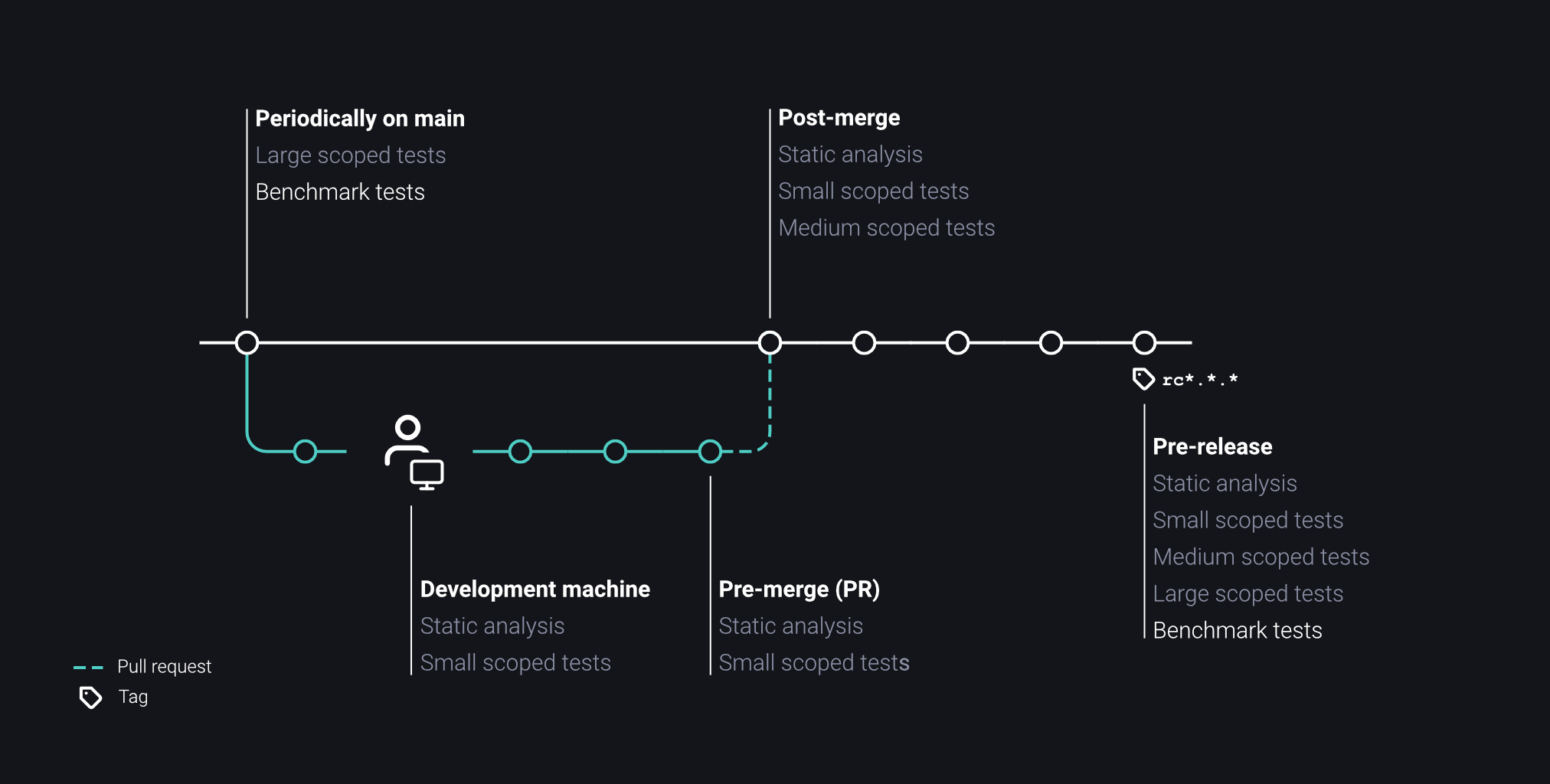
We run benchmark tests multiple times a week during low-traffic hours during the week or on the weekend. The longer we go without running performance tests, the harder it can be to track down the culprit.
Accessibility Tests
Traditionally, accessibility was considered an ethical obligation. An effort to extend our software's usability for users with diverging physical traits in vision, mobility, motor skills, hearing, speech, or cognitive abilities. While the moral argument still stands, I would like to introduce a more cynical one: The more consumers that are able to use our software, the higher our total addressable market. Or simply, the more people we can sell to, the more money we make.
Over the last years the industry developed a lot of tools and guides to write software for a broad spectrum of people. Contrasting and configurable color palettes with scalable user interfaces help render our software for people with vision difficulties. Semantic content tagging provides context for text-to-speech and speech-to-text tools. Enabling navigation via keys, touch, and mouse clicks broadens the number of hardware input devices for our software.
We can test all the above traits with a mix of static analysis and runtime tests. Writing and executing these tests also ensures our UI and APIs follow standardized patterns. Buttons behave the same when focused, hovered, disabled, or processing an action. Testing against these design systems provides an internal consistency across the product experience.
Besides physical accessibility, we develop for a spectrum of demographic, economic, and geographic factors. We test our software runs against a broad range of devices, including potentially outdated hardware and low-bandwidth internet. If our distribution requires localized regulatory compliance, we appraise those when releasing changes to our software.
Our UI accepts Zip codes, phone numbers, and addresses of all forms. Our payment options and processing work beyond US credit cards, our application layout adapts for reading both left-to-right and right-to-left, our software uses culturally invariant upper-case and lower-case characters when processing input text and we support a broad range of character encoding.
I have been forced more than once to abandon an online purchase due to my Austrian zip code not matching the standardized layouts of US addresses.
-
Enjoying the chapter? Unlock the rest.
Engineering Collaboration is currently available as an Advanced Reading Copy for select readers.